
A list of the default dynamic tags available in the Amibe Website Builder.
Dynamic tags are used in content templates to display information based on the context in which it is used.
For example, the Post > Title tag will display a post’s title when used on a post’s page or in a list of posts.
How to do it
To use dynamic tags, while editing a template in the Elementor editor:
- Select the widget you wish to use dynamic tags with.
- Click the Dynamic Tags icon to the right of a configuration field to reveal a list of available dynamic tags.
- Click a tag in the list to select it.
- Click the settings icon that appears to the left of the field to reveal the tag’s Settings.
- From the Options dropdown, select the information to display using the dynamic tag.

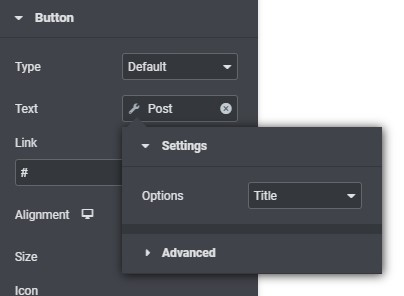

Available Tags
Author (Image) Tag
Available for dynamic images relating to the author of posts and pages.
Avatar
The author’s avatar image; this is the default option.
Author (Link) Tag
Available for dynamic links relating to the author of posts and pages.
Author page
Link to the author’s page (showing posts by that author); this is the default option.
Email link for the author’s email address.
Website
Link to the author’s website; does not show if there is no website URL available for the author.
Author (Text) Tag
Available for dynamic text relating to the author of posts and pages.
Display name
The author’s name selected for public display; this is the default option.
Typically this should be used in preference to any other name option.
The author’s email address.
First name
The author’s first name; does not show if there is no first name available for the author.
Last name
The author’s last name; does not show if there is no last name available for the author.
Nickname
The author’s nickname.
Description
The author’s description; does not show if there is no description available for the author.
Website
The author’s website address; does not show if there is no website address available for the author.
Number of posts
The number of posts published by the author’s; does not show if the author has not published any posts.
Blog (Link) Tag
Available for dynamic links relating to category/archive pages.
Next page link
Link to the next page of posts; does not show if there is no next page.
Previous page link
Link to the previous page of posts; does not show when on the first page.
Page (Text) Tag
Available for dynamic text relating to various pages (that are not posts).
Title
The page title; this is the default option.
Description
A page description; does not show if no description is set.
Post (Image) Tag
Available for dynamic images relating to posts and pages.
Featured image
The post’s featured image; this is the default option.
This applied to any post type that has a featured image assigned, such as for products when the eCommerce platform is enabled.
Post (Link) Tag
Available for dynamic links relating to posts and pages.
Post link
Link to the post; this is the default option.
Comments link
Link to the post’s comment section.
Next link
Link to the ‘next’ post; does not show if there is no next post.
Previous link
Link to the ‘previous’ post; does not show if there is no previous post.
Author
Link to the post’s author page.
Modifier
Link to the page of the user who last edited the post.
Post (Text) Tag
Available for dynamic text relating to posts and pages.
Title
The post’s title; this is the default option.
Excerpt
The post’s excerpt.
Content
The post’s content.
Categories
A list of categories the post is assigned to, with links to those category pages; does not show if the post is not assigned to any categories.
Tags
A list of tags the post is tagged with, with links to those tag pages; does not show if the post is not tagged.
Comments number
The number of published/approved comments for the post; does not show if there are no comments for the post.
Published date
The date the post was published.
Modified date
The date the post was modified; does not show if the published and modified dates are the same.
Published time
The time the post was published.
Modified time
The time the post was modified; does not show if the published and modified dates are the same.
Author
The display name of the post’s author.
For more options use the dynamic Author (Text) Tag instead.
Modified by
The display name of the user who last edited the post; does not show if this is the same as the author.
Product (Text) Tag
Available for dynamic text relating to products. These are only available when the eCommerce platform is enabled.
Title
The product’s title; this is the default option.
Short description
The short description for the product.
Categories
A list of categories the product is assigned to, with links to those category pages; does not show if the product is not assigned to any categories.
Stock
Stock availability for the product; does not show if stock management is disabled.
SKU
The product’s SKU value; does not show if no SKU is assigned to the product.
Sale
A product sale indicator; does not show if the product is not on sale.
Price
The product’s price; does not show if there is no price for the product.
Site (Link) Tag
Available for dynamic links relating to the website.
URL
Link to the website’s home page; this is the default option.
Admin email
Email link for the website administrator (as set under Settings > General).
Site (Text) Tag
Available for dynamic text relating to the website.
Title
The website’s title (as set under Settings > General); this is the default option.
Description
The website’s tagline (as set under Settings > General); does not show if no tagline is set.
URL
The website’s home address.
Admin email
The website administrator’s email address (as set under Settings > General).
Searched term
The search term use; does not show if there is no search term.